
Manual Project Tracking vs Construction Management Software

If you’ve ever managed a construction project, you know it’s about way more than just making a schedule. There’s budgeting, figuring out who’s doing what, keeping track of paperwork, making sure everyone’s talking to each other, and checking in on progress. As jobs get bigger, how you manage all these moving parts can make or break your profits and your reputation with clients. Plenty of small contractors are still running jobs out of spreadsheets, notebooks, random emails, and a lot of phone calls. That works fine when you’ve only got a job or two going. But add a few more crews, a few more clients, and suddenly stuff starts falling through the cracks—a missed change order, a supplier invoice nobody flagged, a subcontractor who never got the updated schedule. That’s usually the point where people start looking at construction management software. It will not change situation on its own, but it does put everything in one location instead of separate in ten different places, which makes it a lot easier to identify problems before they turn into risk. If you’re deciding between manual project tracking and construction management software, knowing their differences may help you choose the right approach for your business.  

What Is Manual Project Tracking?

Manual project tracking is the old technique — Excel sheets, paper notes, whiteboards, email chains, maybe a random app or two thrown into the mix that nobody fully trusts. The project manager collects updates from different teams, vendors, and departments, then manually updates data into reports. That usually means a phone call, an email, or another meeting for details. It’s cheap enough to start with, no real investment needed. But the bigger and more complicated the project gets, the harder it is to keep any of it accurate. Although this method requires little initial investment, it becomes increasingly difficult to retain accuracy as project complexity rises.  

What Is Construction Management Software?

Construction management software is basically a set of digital tools made for people in construction. It helps you handle everything from scheduling and budgeting to paperwork, planning, reporting, working together, and keeping projects moving without a ton of busywork. Instead of juggling a bunch of spreadsheets and sticky notes, all your project info lives in one spot where your team can always check in and get the latest, no matter where they are. Modern construction software also connects with your accounting software, payroll system, and even your phone apps, helping you make choices faster and with more confidence.  

Comparing Manual Project Tracking and Construction Management Software

The biggest difference between these two approaches is how information is managed.  
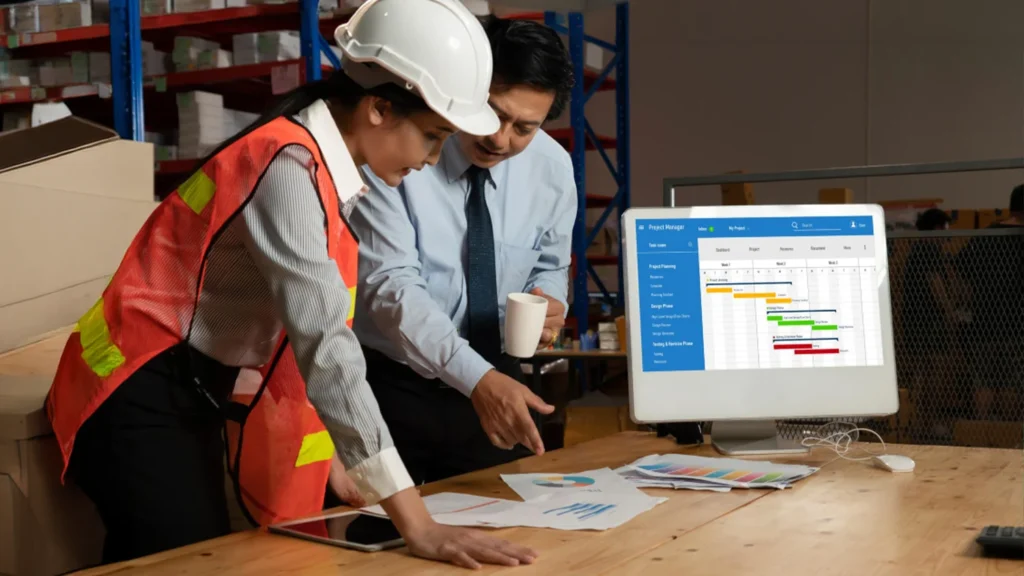
With manual project tracking, project data is scattered across several files, emails, and documents. Team members often spend valuable time searching for information or verifying whether the latest version of a document is being used. Even small mistakes like entering incorrect numbers or missing an update can lead to planning conflicts, budget excesses, or delays.  
Construction management software solves these headaches by putting all your project details in one place. Updates happen right away, so everyone can stay in sync and focus on getting the job done.

px 238

Accuracy and Data Reliability

Manual observation depends entirely on human input. Every budget update, schedule revision, and material request must be entered manually. This increases the chances of data entry errors, duplicate information, and outdated reports.  

Construction management software helps your team keep records up to date as things change. Most programs have checks in place so you make fewer mistakes and everyone can trust the numbers are right. When you have good information, you can spot problems early and make decisions you trust.

px 239

Collaboration Between Teams

Any construction project has many people who need to stay in streamline — project managers, engineers, architects, contractors, suppliers, clients.  When communication happens mostly through email and phone calls, things are not managed properly. Someone does noy get looped in on a change, or two people are working off different versions of the same document without realizing it. 
  
Construction management software fixes a lot of that by giving everyone one shared place to work from. Documents get uploaded once, updates get posted where everyone can see them, tasks get assigned, and progress is visible without anyone needing to dig through fifty email threads to figure out where things stand.

px 240

Managing Project Documents

Construction projects generate thousands of documents, including contracts, drawings, RFIs, change orders, permits, inspection reports, invoices, and safety documents. Managing these files manually becomes increasingly difficult over time. Missing or outdated documents can delay approvals and create compliance issues.  

Construction management software stores records securely in one place while continuing version history. This guarantees everyone works with the latest information and reduces the risk of lost files.  

px 241

Reporting and Decision Making

Generating reports manually often needs gathering information from multiple departments and combining it into spreadsheets. By the time reports are completed, some information may already be outdated.  

Construction management software makes it easy to pull together reports using the latest info. Managers don’t have to wait—they can check project progress, productivity, spending, and resources whenever they need to. This allows leadership teams to respond quickly to changing project conditions.

Scalability

Manual project tracking may be manageable for one or two projects, but it becomes increasingly difficult when companies begin managing several projects at once. As the business grows, keeping separate spreadsheets and documents for each project uses substantial administrative time.  

Construction management software is designed to scale with business growth. Whether overseeing five projects or fifty, the system keeps information organized while preserving consistent processes across all projects.

Expense Considerations

Manual tracking looks like the less expensive option, but there is no software to pay for, so it seems like you’re saving money. But the real costs just show up somewhere else: hours spent on admin work, reports that take forever to pull together, miscommunication between crews and the office, rework because someone had the wrong version of a number, deadlines that slip, budgets that turn out to be off by more than anyone realized. 
  
Construction management software does cost something upfront, sure. But most companies end up making that back pretty quickly through fewer errors, faster reporting, and better use of the people and equipment they already have. Give it some time, and the digital systems almost always come out ahead on ROI compared to running things by hand. 
Which Option Is Right for Your Business?

Manual tracking can still work fine for very small contractors juggling just a few projects with simple workflows. If the team’s small and the jobs are not too complex, an Excel sheet can hold up just fine for a while. Where it starts to differ is when projects get big, more leadership team members get involved in them, or clients start asking for real financial reporting. That’s usually the point where manual methods stop being a minor annoyance and start causing actual problems. 
Construction management software tends to be the smarter move at that stage—it helps teams get more done, communicate better, cut down on the kind of small mistakes that pile up, and make decisions based on numbers they can actually trust. Companies that make the switch generally finish jobs closer to schedule, keep budgets from creeping past where they should be, and end up with clients who are a lot easier to keep happy.

How Proxsoft Helps Construction Companies

At Proxsoft, we build practical technology that makes the day-to-day work of running a construction company a little easier. Our team has actual hands-on experience with Construction Reporting Software, Power BI Dashboards, ERP Consulting & Implementation, workflow tools, data management, mobile apps, and custom builds—not just theory. We’ve spent enough time around job sites and back offices to know the difference between the two, and to know what actually slows people down.

We collect your project data into one place, so your team can see where things stand, keep an eye on the budget, and catch problems while they’re still small and manageable. At the end of the day, our job is to take some of that work off your plate, help your team actually talk to each other, and give you the confidence to make calls without second-guessing the numbers. 

We don’t just hand over a piece of software and walk away. We sit down with your team, figure out what’s actually slowing things down day to day, and build around that instead of forcing you into some rigid, one-size-fits-all system. And once it’s up and running, we don’t disappear—projects change, crews change, and the tools should be able to keep up with that. Construction doesn’t sit still. Neither should the software running it. 

Conclusion

Choosing between manual tracking and construction management software isn’t just about swapping out your paper for a computer. It’s about making your work smoother, helping the team with project status updates. Manual tracking might work for small jobs, but it usually can not keep up as your business grows. It just can’t handle bigger projects. That’s why using project management technology isn’t just a nice-to-have anymore—it’s how you stay ahead and set yourself up for long-term success. This is where something like Proxsoft comes in. Instead of balancing multiple tasks — Excel sheets, whiteboards, and a dozen emails —everything—schedules, budgets, invoices, crew updates—lives in one place your whole team can actually access. No more chasing someone down for a status update or double-checking numbers that were typed in twice by two different people. It’s not about replacing your team’s judgment; it’s about giving them one clean source of truth so they can spend less time hunting for information and more time actually getting the job done.

Leave a Comment

Your email address will not be published. Required fields are marked *

Scroll to Top